AEROStand Z 2.0

AEROStand Z 2.0

Grey
$80.00 USD
Sale price  $80.00 USD Regular price  $150.00 USD
Skip to product information
AEROStand Z 2.0
Rated 4.9 Excellent
Trustpilot 150,000+ Customers

AEROStand Z 2.0

$80.00 USD
Sale price  $80.00 USD Regular price  $150.00 USD
Shipping calculated at checkout.
112,847 Sold

Why the AEROStand Z 2.0

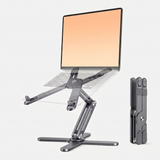
  • Adjusts 1.8" to 10.4" for true eye-level positioning
  • Holds 22 lbs with zero wobble on any surface
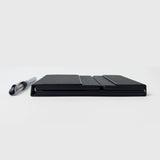
  • 1.58 lbs, folds to the size of a tablet
  • Clinically shown to improve posture and reduce pain
  • Aircraft-grade aluminum, built to last
  • Improves thermals so your laptop runs cooler and faster
69people viewing this right now...
BUNDLE & SAVE
Premium offer expires in … ⏰
Color
#1
#2
Color
Ordered
Jul 17
Shipped
Jul 18
Delivered
Jul 20 – Jul 24

The AEROStand Z 2.0 is compatible with

  • Smartphones
  • Laptops
  • MacBooks
  • Surfaces
  • Tablets
Works with

It is not compatible with

  • Cast-iron skillets
  • TVs
  • Refrigerators
  • Golden retrievers
  • Your ex's feelings
Product Description
What's In the Box?
  • AEROStand Z laptop stand
  • Bearing adjuster tool
  • Soft-lined travel pouch
  • User guide
Will it fall off and Damage my Device?

No. The AEROStand Z 2.0 is engineered to hold your device securely. In fact, it's safer than resting your laptop directly on a table, where the machine can slide on a smooth surface, overheat against blocked vents, or get knocked by a bag or elbow.

Four padded silicone grips lock onto your laptop or tablet without slipping or scratching, and the aircraft-grade aluminum X-frame distributes weight across four contact points, so it stays planted with up to 22 lbs on top, well beyond any laptop.

The adjustable tension bearings hold your chosen angle firmly instead of drifting, and the non-slip feet keep the base steady on desks, cafés, and uneven surfaces alike. That said, if you deliberately knock the stand over, that's not something any stand can prevent. In normal everyday use though, your device sits locked in place, exactly where you set it.

How does the height adjustment work?

The stand uses adjustable tension bearings on both sides that you lock at your preferred angle. Height ranges from 1.8" (low-profile desk mode) to 10.4" (full eye-level ergonomic height). A bearing adjuster tool is included to fine-tune the tension to your preference.

How small does it fold?

Folded dimensions are 11.4" × 2.75" × 1.77", about the size of a thick iPad. It weighs 1.58 lbs and comes with a soft-lined travel pouch, so it fits in any bag without scratching other gear.

Will it wobble on a desk?

No. The X-frame design distributes weight evenly across four silicone contact points. It holds up to 22 lbs without wobble, including the heaviest gaming laptops. Works on flat surfaces, slightly uneven desks, and soft surfaces like beds or laps.

Product Specifications

Weight: 1.58 lbs (717g)

Height range: 1.8" to 10.4" (4.5cm to 26.4cm)

Folded size: 11.4" x 2.75" x 1.77" (29 x 7 x 4.5cm)

Max load: 22 lbs (10kg)

Device compatibility: 10" to 18" laptops, tablets, phones

Material: Aircraft-grade aluminum with silicone padding

What's included: Stand, bearing adjuster tool, soft-lined travel pouch, user guide

Warranty & Returns

Every AEROStand Z 2.0 is backed by a 60-day warranty covering defects in materials and workmanship. If a fault appears within 60 days of delivery, contact us and we'll repair or replace it free of charge, no hassle.

Shipping

Orders placed before 2:00 PM MST ship the same business day. US delivery in 1 to 5 business days. Free shipping on orders over $100. International shipping available at checkout.

  • Free shipping over $100
  • 60-Day Money-Back
  • Ships Same Day

70 people bought this in the last 24 hours

Due to high demand, limited quantities are available

92% SOLD Selling out fast
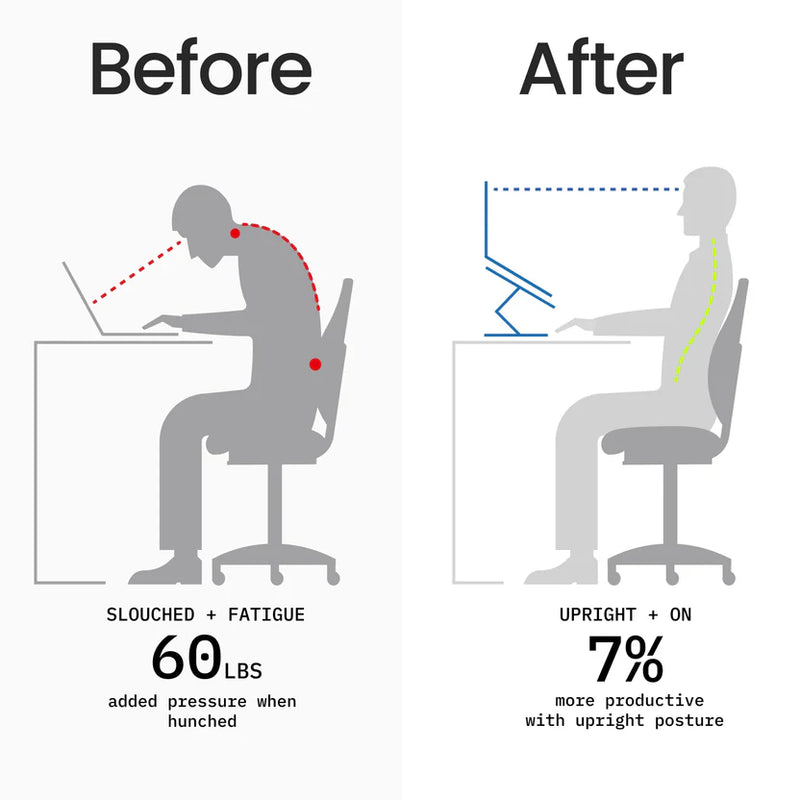
After
Before
BeforeAfter

THE DIFFERENCE

I HAVEN't LOOKED BACK

"My girlfriend noticed my posture wasn't healthy so I went to my chiropractor. He recommended for me to by the AEROStand after a diagnosis and I haven't looked back ever since. My posture has dramatically improved and I have been able to be significantly more productive while working on my MacBook" - Allan

THE CHRONIC NECK PAIN EPIDEMIC EXPLAINED

It's not just bad posture. It's a structural problem, and laptop users are the most exposed.

Play video
Why It Matters

The Real Cost of Working at Desk Level.

Poor laptop ergonomics cost remote workers their health, focus, and hardware. Here's what's at stake.

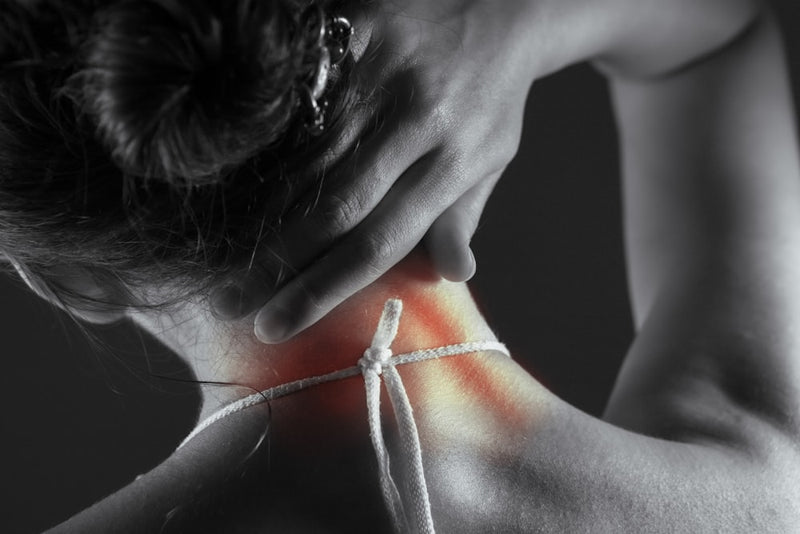
Person with neck and back pain from working hunched over a low laptop
Physical Risk

Chronic Neck & Back Pain

Sitting with your screen below eye level for 6+ hours a day forces your neck forward at 40 to 60°, putting 60 lbs of force on your spine. Clinicians call it 'text neck.' Ergonomists call it preventable.

Tired worker slumped asleep on a laptop from poor ergonomics
Financial Risk

Lost Productivity

Studies show proper ergonomics improve sustained focus by up to 25%. Poor posture leads to fatigue faster, costing the average knowledge worker 1 to 2 hours of effective output per day.

Laptop glowing hot in the dark from blocked airflow
Device Risk

Laptop Overheating

Flat on a desk, your laptop blocks its own vents. Sustained thermal throttling reduces CPU performance by up to 30%, shortening your machine's lifespan and slowing everything down.

Global Press Coverage

"Engineers state-of-the-art gear that fuses precision engineering, premium materials, and elite craftsmanship.
"The most refined portable laptop stand we've tested: adjustable, stable, and genuinely compact.
"Engineers their gear for today's remote workers: space-saving, durable, smart, and whisper-quiet.
"Aircraft-grade aluminum, adjustable bearings, and a fold that fits in your jacket pocket.
AERIS
DWG AZ-SPEC-001
REV 2.0
Compact Fold
Volume reduction folded
85%
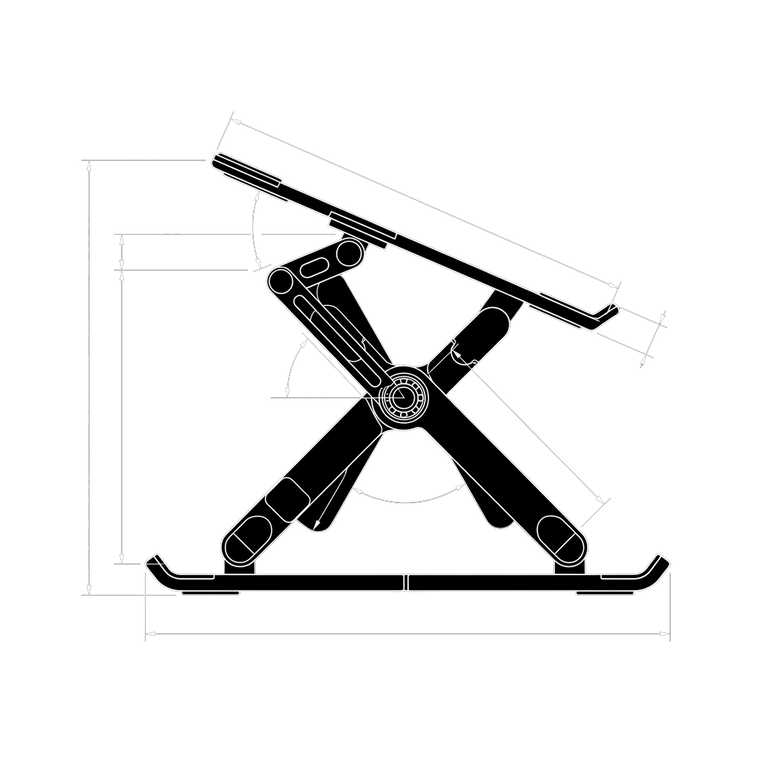
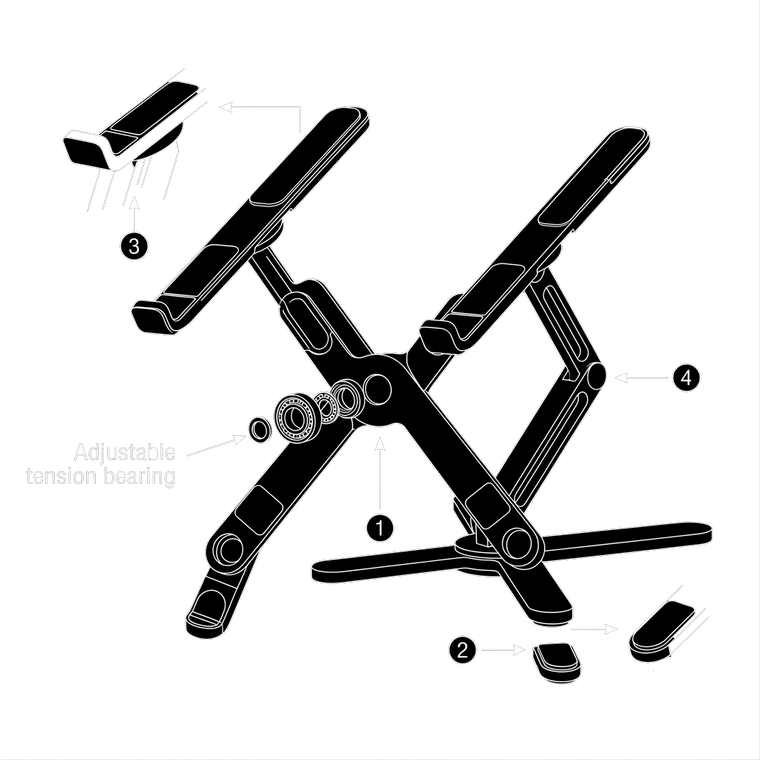
AERIS — exploded side view
10.4"
Height
11.4"
Width
Max Load
22L
Net Weight
0.72KG
Tech Specs
Type
Laptop Stand · Portable · Ergonomic
Pocketing
10"–18" Devices
Packing Volume
1.8"4"7"10.4"
Travel Duration
DeskCaféHotelFlight
Compressed Volume
OpenTiltFoldPack
Materials
Aircraft-Grade Aluminum
Technical Specifications
AERIS — back view
Dimensions
10.4" × 11.4" × 1.77"w/ expansion
Volume
22Lw/ smart compression
Weight
0.72 KGultralight build
Material
Aircraft-Grade Aluminumweatherproof coated
12 Feature Pillars
01 X-Frame Stability
02 Bearing Tension Adjustment
03 Aircraft-Grade Aluminum
04 Silicone Grip System
05 Travel Pouch Included
06 22 lb Load Rating
07 Thermal Airflow Design
08 Eye-Level Positioning
09 Compact Fold Form
10 Anti-Scratch Pads
11 Tool-Free Assembly
12 Universal Compatibility
Type: Laptop Stand · Portable · Ergonomic
Aircraft-Grade Aluminum + Silicone
Designed for the desk-free generation
Load Rating
Max Device Weight
SolidsLiquids
IP
X
8
1Blocks objects >50mm
2Blocks objects >12.5mm
3Blocks objects >2.5mm
4Blocks objects >1mm
5Dust protected
6Dust-tight
1Dripping water
2Angled drips (15°)
3Water spray
4Water splashes
5Water jets
6Powerful water jets
7Immersion in 1m
8Immersion beyond 1m
Bill of Materials
ItemComponentSpecificationCode
01 Frame Aircraft-Grade Aluminum ALU-X1
02 Grips Silicone Padding SIL-G1
03 Bearings Adjustable Tension BRG-T1
04 Adjuster Tool Hex Key TOL-H1
05 Travel Pouch Soft-Lined Nylon PCH-N1
06 User Guide Printed Insert DOC-U1
General Notes
1. Adjustable tension bearings, tool included for personalization
2. X-frame distributes load evenly across four contact points
3. Height range: 1.8" to 10.4" (true eye-level ergonomic positioning)
4. Compatible with 10" to 18" devices including laptops, tablets, phones
5. Weight: 1.58 lbs (0.72 kg), folded: 11.4" × 2.75" × 1.77"
6. Includes: stand, adjuster tool, soft-lined travel pouch, user guide
7. Aircraft-grade aluminum with non-scratch silicone grips
No Solvents Wipe Clean No Impact Air Dry Folded Storage

Generation 2.0

Everything the original was, now engineered further.

We took the original AEROStand back to the drawing board. The Z 2.0 holds more, reaches higher, weighs less, and moves in ways the first generation never could.

15 → 22 lbs

A stronger hold

The reinforced X-frame now carries 22 lbs without flex, nearly 50% more than the original, so even the heaviest laptops sit rock-steady.

8.7 → 10.4 in

Higher eye level

An extended range lifts your screen to a full 10.4" for true eye level, reaching taller setups the first generation couldn't.

2.1 → 1.58 lbs

Lighter to carry

A retooled aluminum frame drops half a pound. It folds thinner and disappears into any bag more easily than before.

New

360° rotation

A new swivel base lets you spin your screen to share with a colleague or client, something the fixed original never did.

Upgraded

Non-slip silicone grips

Foam pads are gone. Full-silicone contact points grip harder and won't scuff your device, even mid-adjustment.

Upgraded

Infinite angle control

Preset stops are replaced by adjustable tension bearings, so you can lock in any angle you want, not just the three the original allowed.

Improvements measured against the first-generation AEROStand.

How to use

3 STEP SETUP FOR THE AEROSTAND Z 2.0

  1. Unfold the X-frame from its travel-flat position. No tools, no assembly.

  2. Set your angle and lock the adjustable tension bearings, anywhere from 1.8" to 10.4".

  3. Rest your laptop on the padded silicone grips and work at true eye level.

Eye Level in Under 10 Seconds

Adjustable tension bearings let you set your preferred height anywhere between 1.8" and 10.4", then lock it there. Your screen sits at eye level, your neck stays straight, and you stop hunching within the first session. No tools required to open or close. Pull it out, set your angle, place your laptop. It takes under 10 seconds and the difference is immediate.

Fits in a Pocket. Works Anywhere.

Folded to 11.4" × 2.75" × 1.77" and weighing just 1.58 lbs, the AEROStand Z disappears into any bag: laptop sleeve, carry-on, daypack, jacket pocket. The included soft-lined travel pouch protects both the stand and whatever it's packed with. WeWork lobby, airport gate, hotel desk, couch. Your ergonomic setup goes everywhere you do, and it takes under 10 seconds to deploy.

Built for 22 lbs. Holds Without Flex.

The AEROStand Z is milled from aircraft-grade aluminum, the same material used in aerospace frames. The X-brace design distributes load across four silicone feet, creating a stable base that holds up to 22 lbs without wobble on any surface. Elevating your laptop also frees the underside vents completely. Studies show this reduces CPU temperatures by 10 to 15°C and prevents thermal throttling that cuts performance by up to 30%.

AEROStand Z 2.0 — Portable Foldable Laptop Stand
Load Rating X-Frame · Aircraft Aluminum · 22 lb Max

Stable by design.

Built for your heaviest day.

The AEROStand Z's X-brace geometry distributes weight across four contact points, eliminating the single-point wobble that plagues most stands. At 22 lbs max load, it holds every laptop ever made. Zero flex. Zero slip. Every surface.

0lbs
Empty
5lbs
Tablet
14lbs
Max Laptop
22lbs
Rated Max

THE #1 STAND FOR POSTURE & PRODUCTIVITY

SUMMER SALE, SAVE UP TO $200 ON BUNDLES

DESIGNED FOR PREMIUM ERGONOMICS

AEROStand Z vs. Other Stands

AERIS Others
Holds Up to 22 lbs
Collapses after 10 lbs
Adjusts 1.8" to 10.4"
×
Improves Laptop Thermals
×
Net Weight
1.58 lbs 2.5–4 lbs
Travel Pouch Included
×
Full 360° Swivel Rotation
×
Non-Slip Silicone Grips
×
Adjustable Tension Stability
×
Sleek, Premium Design
×

Frequently Asked Questions

What devices is it compatible with?

The AEROStand Z is compatible with any device between 10" and 18": MacBooks, Windows laptops, iPads, tablets, and phones. Silicone grips hold devices up to 22 lbs without slipping or scratching.

How does the height adjustment work?

Adjustable tension bearings on both arms lock at any angle. Height ranges from 1.8" (low desk mode) to 10.4" (full eye-level). A bearing adjuster tool is included for fine-tuning tension to your preference.

What if I need to set it up on the go?

No assembly needed. Unfold, set your angle, place your device. The entire setup takes under 10 seconds. The soft-lined travel pouch keeps it protected in any bag.

Will it wobble on a non-flat surface?

The X-frame distributes weight across four silicone contact points. It holds 22 lbs without wobble on desks, cafes, hotel surfaces, or uneven counters. Zero flex in the frame.

Does elevating my laptop actually improve thermals?

Yes. Raising your laptop off any surface frees the underside vents and allows airflow underneath. Studies show this can reduce CPU temperatures by 10 to 15°C, preventing thermal throttling that cuts performance by up to 30%.

What's the return policy?

60-day 100% satisfaction guarantee. If you're not completely satisfied for any reason, contact us and we'll issue a full refund, no questions asked.

When will my order ship?

Orders placed before 2:00 PM MST ship the same business day. US delivery in 1 to 5 business days. Free shipping on orders over $100.

Is it worth the price?

One stand eliminates neck pain, boosts thermal performance, and sets up ergonomic workspaces anywhere: cafes, airports, hotels. At 1.58 lbs it's the lightest premium aluminum stand you can buy. If you use a laptop daily, it pays for itself in recovered productivity within the first week.

Will it actually fit in a carry-on or laptop bag?

Yes. Folded to 11.4" × 2.75" × 1.77", it fits in any laptop bag, carry-on, or large pocket. It's thinner than most 13" laptops when folded. The included pouch protects everything it's packed with.